Compatible with Vitest! Component Testing of Next.js v16 with Storybook, Part 2: App Router Configuration & Module Mocks
Back to Top
To reach a broader audience, this article has been translated from Japanese.
You can find the original version here.
Introduction
#This is Tsukano from the Business Solutions Department.
This article is the second part of "Compatible with Vitest! Component Testing of Next.js v16 with Storybook."
In the first part, we covered how to set up Storybook and its basic usage. In this article, we'll summarize Next.js-specific configurations and module mocking.
Mocking next/router and next/navigation
#In Next.js, there are the next/router and next/navigation packages for handling page transitions and referencing/updating URLs.
next/router is mainly used with the Page Router, while next/navigation is used with the App Router. In Storybook (@storybook/nextjs-vite), the next/router package is stubbed by default, and the router object is replaced with a mock that outputs events to the Actions tab.
The next/navigation package is also automatically stubbed, so you can call usePathname, useSearchParams, useRouter, etc., in your Stories. However, when using the App Router, you need to explicitly inform Storybook that you are using it. This can be set per Story, but if your entire project assumes App Router, it's convenient to write it in .storybook/preview.ts so that it applies to all Stories.
import type { Preview } from '@storybook/nextjs-vite';

const preview: Preview = {
  ...
  parameters: {
    ...
    nextjs: {
      appDirectory: true, // ← Set to true when using App Router
    },
  },
};

export default preview;
Here, let's create a component that uses the next/navigation package and its Story.
You can skip reading the component code. This component updates the current URL's search parameters based on the value entered in an input. Inside the component, it uses useRouter and useSearchParams from the next/navigation package.
'use client';

import Link from 'next/link';
import { usePathname, useRouter, useSearchParams } from 'next/navigation';
import { useState } from 'react';

export function NavigationDemo() {
  const pathname = usePathname();
  const router = useRouter();
  const searchParams = useSearchParams();
  const [query, setQuery] = useState(searchParams.get('query') ?? '');
  const [currentQuery, setCurrentQuery] = useState(searchParams.get('query') ?? '');

  const apply = () => {
    const next = new URLSearchParams(searchParams.toString());
    query ? next.set('query', query) : next.delete('query');
    const queryString = next.toString();
    router.replace(queryString ? `?${queryString}` : '?');
    setCurrentQuery(query);
  };

  return (
    <div>
      <input value={query} onChange={(e) => setQuery(e.target.value)} className="p-2 border border-black" />
      <button onClick={apply} className="p-2 border border-black">Apply</button>
      <Link href={`${pathname}/link?query=${query}`} className="ml-2 underline">
        go to Link
      </Link>
      <div>current path: {pathname}</div>
      <div>current query: {currentQuery || '(empty)'}</div>
    </div>
  );
};
The Story for this component is created as follows:
import type { Meta, StoryObj } from '@storybook/nextjs-vite';
import { getRouter } from '@storybook/nextjs-vite/navigation.mock';   // Mock for useRouter()
import { expect, userEvent, within } from 'storybook/test';

import { NavigationDemo } from './NavigationDemo';

const meta = {
  component: NavigationDemo,
  parameters: {
    nextjs: {
      appDirectory: true,
      navigation: {
        pathname: '/demo/navigation',   // You can set the initial URL path in the Story
        query: { query: 'initial' },    // You can set initial query parameters in the Story
      },
    },
  },
} satisfies Meta<typeof NavigationDemo>;

export default meta;
type Story = StoryObj<typeof meta>;

export const ReplaceIsCalled: Story = {
  async play({ canvasElement }) {
    const c = within(canvasElement);
    getRouter().replace.mockClear();

    await userEvent.clear(await c.findByRole('textbox'));
    await userEvent.type(await c.findByRole('textbox'), 'hello');
    await expect(c.getByRole('link', { name: 'go to Link' })).toHaveAttribute(
      'href',
      '/demo/navigation/link?query=hello',
    );
    await userEvent.click(await c.findByRole('button', { name: 'Apply' }));

    // Asserting that useRouter().replace() was called
    await expect(getRouter().replace).toHaveBeenCalledWith('?query=hello');
  },
};
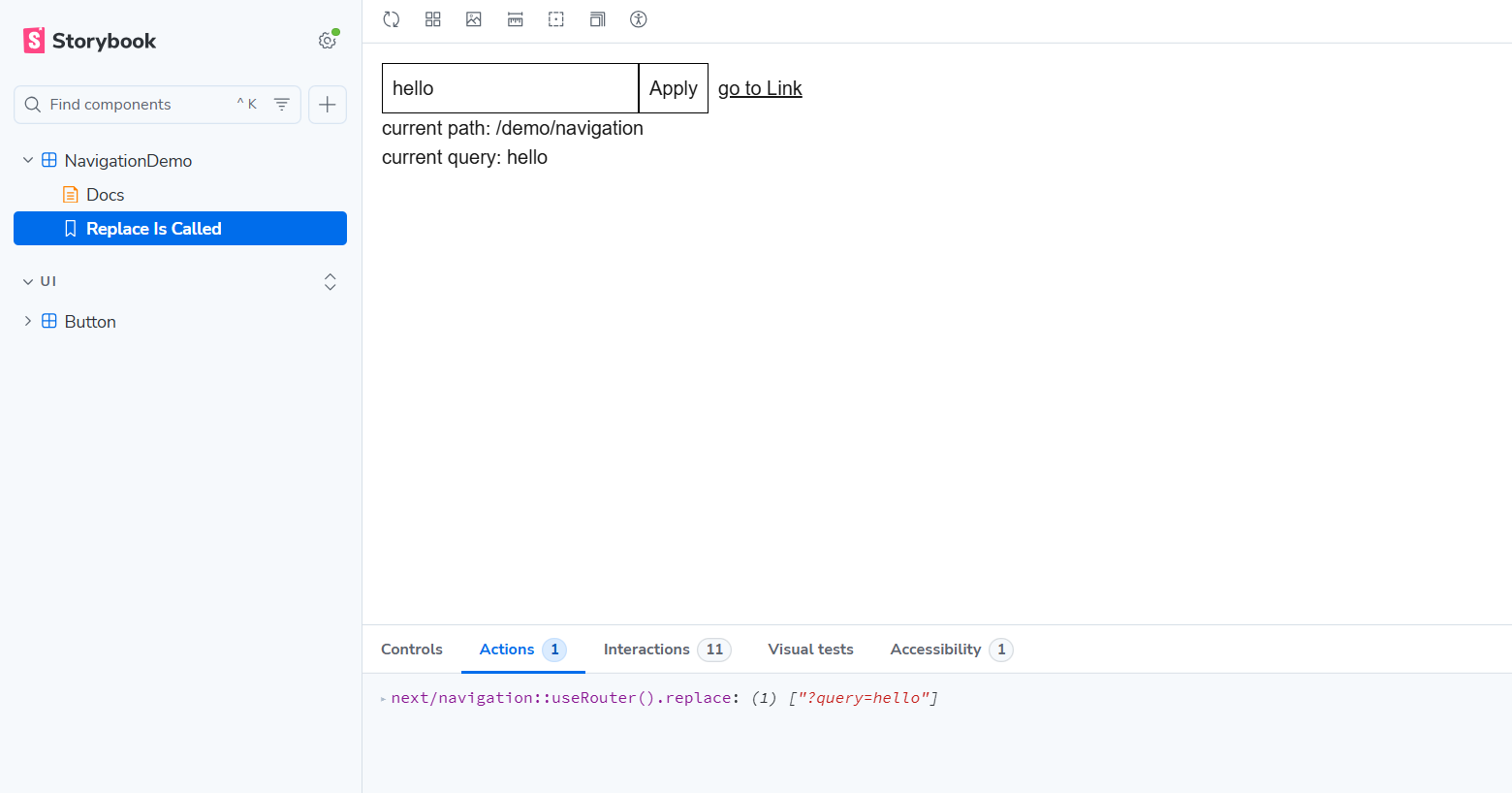
If you want to change the pathname or query for each Story, override parameters.nextjs.navigation in the meta object. This allows you to reproduce URL-dependent components (active states, display of search criteria, etc.) on a per-Story basis.
parameters.nextjs.navigation is convenient for reproducing the initial state, but it is insufficient when you want to verify calls, such as checking that router.push() was called on a click.
This is where @storybook/nextjs-vite/navigation.mock comes in. In addition to providing a mock implementation of next/navigation, it lets you obtain a router object equivalent to useRouter() via getRouter(), allowing you to assert calls such as push, replace, and back in your tests.
When you click the Apply button in this component's Story, the entered query parameters are output in the Actions tab, showing that the router object is mocked.
For built-in mocks other than @storybook/nextjs-vite/navigation.mock, refer to: Built-in mocked modules | Storybook docs
Another package related to page navigation is next/link. The Link component included in this package is commonly used as an extension of the <a> tag with pre-fetching capabilities. Because this Link uses the router objects from next/navigation and next/router internally, it should also be mocked along with those packages.
However, in Storybook configured with Next.js (15 and above) + App Router, there have been reports that clicking the Link component attempts to navigate to a page outside of Storybook's iframe. (storybookjs/storybook | GitHub). In fact, clicking the "go to Link" button in NavigationDemo triggers a page navigation (Storybook v10.2.7 at time of writing). Until this is fixed, you may need to mock the Link component into a plain <a> tag on Storybook using a module mock, as described later.
Using React Server Components and Mocking Server Functions
#In the App Router, components are treated as React Server Components (RSC) by default, unless they are explicitly marked as Client Components using the use client directive.
In particular, RSC implemented as async functions cannot be used in Storybook as is.
As of Storybook v10.2.7 (@storybook/nextjs-vite), RSC support is experimental, so to render RSC in Storybook you need to explicitly enable the feature.
Specifically, set features.experimentalRSC: true in .storybook/main.ts.
import type { StorybookConfig } from '@storybook/nextjs-vite';

const config: StorybookConfig = {
  framework: '@storybook/nextjs-vite',
  features: {
    experimentalRSC: true,    // Set experimentalRSC: true to use RSC
  },
};

export default config;
This setting allows RSC to run in Storybook. However, if your component calls server functions (such as DB connections or file access) marked with the "server actions" directive, these also cannot be executed in Storybook.
A best practice in Next.js is to separate server functions into their own modules, rather than writing data-fetch functions directly in the RSC.
Storybook allows you to mock modules imported within components (Mocking modules | Storybook docs). Therefore, when using server functions, you can mock the entire module in Storybook and replace it with UI-friendly return values.
Also, because Storybook is intended for component display checks and behavior verification, it's better to mock out actual server-dependent processes so they aren't executed.
In Storybook v10.2, the recommended approach for module mocks in Vite/webpack environments is provided via sb.mock().
As an example of module mocking, we prepared the following server function getGreeting.ts:
"server actions"

export async function getGreeting(name: string) {
  // In a real environment, this would access a DB or external API
  return `Hello, ${name}!`;
}
To mock this function, register the mock in .storybook/preview.ts. You cannot register mocks within individual Stories.
This ensures that the target module is replaced before running any Story, and you can control return values on a per-Story basis.
import type { Preview } from '@storybook/nextjs-vite';
import { sb } from 'storybook/test';

// Register mocks in preview.ts
sb.mock(import('../src/server/getGreeting.ts'));

const preview: Preview = {
  parameters: {
    nextjs: { appDirectory: true },
  },
};

export default preview;
The following points should be noted when registering mocks:
- If you are using TypeScript (when mocking functions in
.tsfiles), useimport()insidesb.mock(). - You cannot use aliases like
@. You must specify the path relative topreview.ts. - Include the file extension in the path.
With this configuration, getGreeting.ts will be mocked in Storybook. However, in this case, all functionality of getGreeting.ts is lost in Storybook. If you want to spy on the function while retaining its functionality, include { spy: true } as the second argument to sb.mock():
sb.mock(import('../src/server/getGreeting.ts'), { spy: true });
Now, let's create a component that uses this function and its Story file to see how the mocked function is used in Storybook.
import { getGreeting } from '@/actions/getGreeting';

type Props = { name: string };

export async function GreetingPanel({ name }: Props) {
  const message = await getGreeting(name);

  return (
    <div>
      <h3>Greeting</h3>
      <p>{message}</p>
    </div>
  );
}
It's a simple component that fetches a message using getGreeting and displays it.
import type { Meta, StoryObj } from '@storybook/nextjs-vite';
import { expect, mocked } from 'storybook/test';
import { within } from 'storybook/test';

import { GreetingPanel } from './GreetingPanel';
import { getGreeting } from '../server/getGreeting';

const meta = {
  component: GreetingPanel,
  args: { name: 'Taro' },
} satisfies Meta<typeof GreetingPanel>;

export default meta;
type Story = StoryObj<typeof meta>;

export const Basic: Story = {
  // Set up return values and such for the mocked function in beforeEach()
  async beforeEach() {
    mocked(getGreeting).mockResolvedValue('Hello from mocked function!');
  },
  async play({ canvasElement }) {
    const canvas = within(canvasElement);
    await expect(getGreeting).toHaveBeenCalledWith('Taro');
    await expect(canvas.getByText('Hello from mocked function!')).toBeTruthy();
  },
};
We created the Story for GreetingPanel. When using a mocked function in a Story, set up the mock's return values inside beforeEach(). You can place beforeEach() inside each Story, or define a beforeEach property in meta to apply it to all Stories.
Pass the function you registered as a mock in preview.ts to mocked(). Then set up its return value with mockResolvedValue() if the function is asynchronous. If the mocked function is synchronous, use mockReturnValue(value), and if you want to provide a custom implementation, use mockImplementation(fn).
Summary
#So far, we have introduced testing Next.js components using component tests with the Vitest add-on and module mocks. With Storybook, you can also perform Visual Regression Testing (VRT) and accessibility testing by using additional add-ons.
Although there is a bit of a learning curve, the ability to integrate into CI pipelines and to deploy and share with designers makes it an indispensable tool in front-end development once you master it.
Storybook supports a wide range of frameworks beyond Next.js, including Vue.js and Angular. If you're interested, why not consider giving it a try?